yarn dlx @sabinmarcu/foreverwinter
sh
Start the manager with no command:
yarn dlx @sabinmarcu/foreverwinter
The list contains only complete triplets. An entry with [+] is enabled; an entry with [-] is disabled. Files that do not form a complete .pak, .ucas, and .utoc set do not appear, and the manager does not repair or remove them.
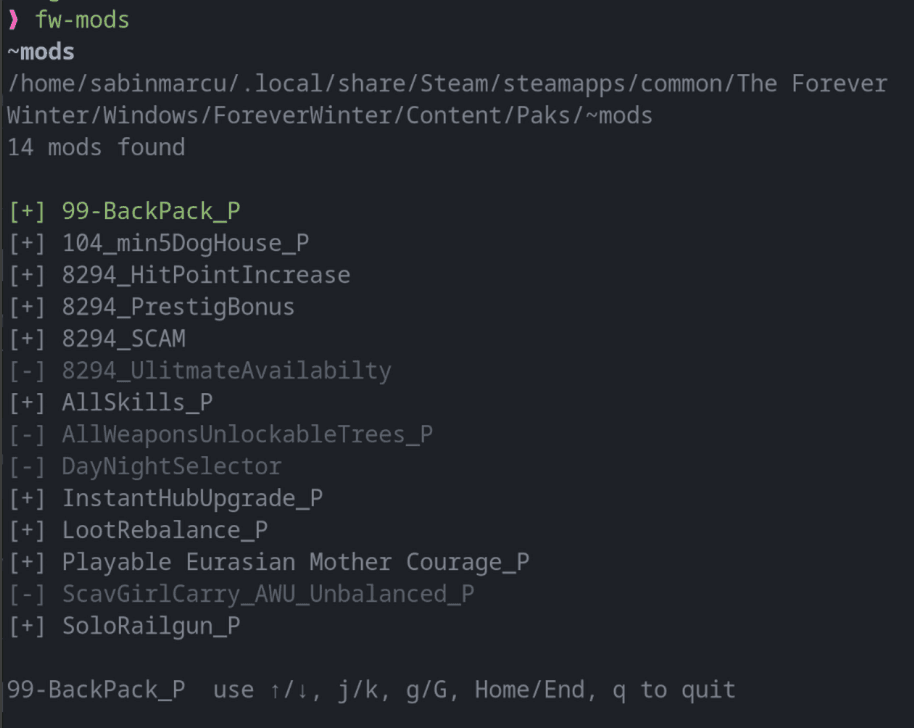
Move with the Up and Down arrow keys or j and k. Press Space on the selected entry to toggle it.
Disabling renames all three files by appending .disabled. Enabling removes that suffix from all three files. The mod data remains in the selected mods directory in either state, so toggling is reversible.
Use g or Home to select the first entry, G or End to select the last entry, and q or Ctrl+C to quit. The manager requires an interactive terminal; it exits when standard input or output is not a TTY.